Introduction to Rendering
What is rendering? At its core, rendering is the process of generating a 2D image from a 3D scene. The generated image can be realistic or stylized.
In computer graphics, there are two ways to render a 2D image from a 3D scene. The first is rasterization, where we take 3D objects and mathematically project them forward onto the 2D screen. The second is ray tracing, where we work backward, shooting virtual rays of light from the camera into the scene to see what they hit.
In this post, we will build both methods from the ground up. Instead of just skimming high-level ideas, we’ll dive into the real math and algorithms powering modern graphics engines.
Here is what we’ll cover in detail:
- Homogeneous Coordinates & Transformations
- The Rasterization Pipeline (Object → World → Camera → Clip → NDC → Screen)
- Ray Tracing, Geometry, and Shading
- Path Tracing Basics (I have a separate, detailed post on this!)
- Signed Distance Functions (SDF) & Sphere Tracing
Along the way, I’ll provide the GLSL code for these concepts so you can see exactly how the math translates into practice.
The Matrix Problem: Why Translation is Hard
The goal in real-time graphics is to express every geometric operation — scale, rotate, translate — as a single matrix multiplication, so the GPU can process millions of vertices with one unified instruction.
Rotation and scaling both work as $2 \times 2$ matrix multiplications:
$$ \begin{bmatrix} x' \\ y' \end{bmatrix} = \mathbf{M} \begin{bmatrix} x \\ y \end{bmatrix} $$Translation is the problem. Moving a point by $(t_x, t_y)$ requires addition, not multiplication:
$$x' = x + t_x, \qquad y' = y + t_y$$There is provably no $2 \times 2$ matrix that can do this — any linear map $\mathbf{M}$ must send the origin to itself, but translation moves it.
Homogeneous Coordinates
The fix, developed in projective geometry, is to embed our 2D world in a higher-dimensional space by appending a coordinate $w$:
$$ (x,\, y) \;\longrightarrow\; \tilde{\mathbf{P}} = (x,\, y,\, 1) $$Every real 2D point lives on the hyperplane $w = 1$. To recover a 2D point from a homogeneous triple, we divide through by $w$:
$$\tilde{\mathbf{P}} = (\tilde{x},\, \tilde{y},\, \tilde{w}) \;\longrightarrow\; \mathbf{P} =\!\left(\frac{\tilde{x}}{\tilde{w}},\; \frac{\tilde{y}}{\tilde{w}}\right)$$This division is called the perspective divide. Note: any scalar multiple $(\lambda x, \lambda y, \lambda)$ represents the same 2D point, because the $w$-divide cancels $\lambda$.
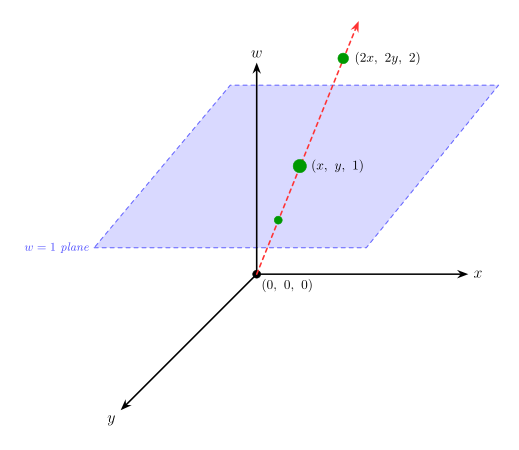
Why this enables translation. In homogeneous coordinates, adding $(t_x, t_y)$ to a 2D point becomes a shear in 3D — a purely linear operation — representable by a $3 \times 3$ matrix multiplication. The dimension we added is doing real work.
The key semantic distinction. In 3D, homogeneous coordinates are $\langle x, y, z, w \rangle^T$ and the rule is:
| $w$ value | Interpretation | Affected by translation? |
|---|---|---|
| $w = 1$ | A point in space | Yes |
| $w = 0$ | A direction (free vector) | No — the translation column is nullified |
This is not arbitrary. A point has a position, so its homogeneous form gets $w=1$:
$$ \tilde{\mathbf{p}}_1 = \begin{bmatrix} x_1 \\ y_1 \\ z_1 \\ 1 \end{bmatrix}, \qquad \tilde{\mathbf{p}}_2 = \begin{bmatrix} x_2 \\ y_2 \\ z_2 \\ 1 \end{bmatrix} $$But a vector is the difference between two points. For example, the displacement from $\mathbf{p}_2$ to $\mathbf{p}_1$ is:
$$ \tilde{\mathbf{v}} = \tilde{\mathbf{p}}_1 - \tilde{\mathbf{p}}_2 = \begin{bmatrix} x_1-x_2 \\ y_1-y_2 \\ z_1-z_2 \\ 1-1 \end{bmatrix}= \begin{bmatrix} v_x \\ v_y \\ v_z \\ 0 \end{bmatrix}= \begin{bmatrix} \mathbf{v} \\ 0 \end{bmatrix} $$Here $\mathbf{v}=(v_x,v_y,v_z)^T$ is the ordinary 3D direction part, and $\tilde{\mathbf{v}}=(\mathbf{v},0)^T$ is its homogeneous form. So vectors naturally have $w=0$. This matches their meaning: a vector has length and direction, but no fixed location in space.
Now look at what a general affine transform does to a point:
$$ \begin{bmatrix} \mathbf{M}_{3\times3} & \mathbf{t} \\ \mathbf{0}^T & 1 \end{bmatrix} \begin{bmatrix} \mathbf{p} \\ 1 \end{bmatrix}= \begin{bmatrix} \mathbf{M}\mathbf{p} + \mathbf{t} \\ 1 \end{bmatrix} $$The same transform applied to a direction vector gives:
$$ \begin{bmatrix} \mathbf{M}_{3\times3} & \mathbf{t} \\ \mathbf{0}^T & 1 \end{bmatrix} \begin{bmatrix} \mathbf{v} \\ 0 \end{bmatrix}= \begin{bmatrix} \mathbf{M}\mathbf{v} + \mathbf{t}\cdot 0 \\ 0 \end{bmatrix}= \begin{bmatrix} \mathbf{M}\mathbf{v} \\ 0 \end{bmatrix} $$The translation column is multiplied by $w=0$, so it vanishes. That is exactly what we want: translating the entire coordinate system should move points, but it should not change a direction like “up”, “forward”, or “from this point to that point.”
2D Transformations
We classify transformations by their degrees of freedom (DoF) and the geometric properties they preserve.
2D Translation — 2 DoF
$$x' = x + t_x, \qquad y' = y + t_y$$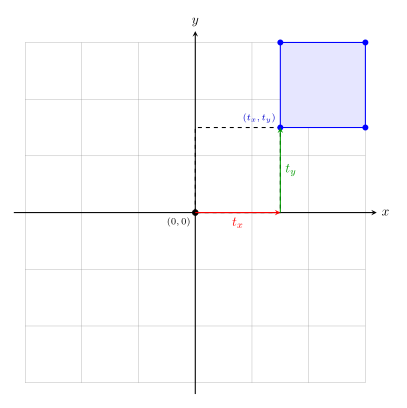
Appending $w=1$ converts the addition into a $3 \times 3$ matrix multiply:
$$ \begin{bmatrix} \color{#ef4444}1 & \color{#22c55e}0 & \color{#3b82f6}t_x \\ \color{#ef4444}0 & \color{#22c55e}1 & \color{#3b82f6}t_y \\ \color{#ef4444}0 & \color{#22c55e}0 & \color{#3b82f6}1 \end{bmatrix} \begin{bmatrix} x \\ y \\ 1 \end{bmatrix} = \begin{bmatrix} x + t_x \\ y + t_y \\ 1 \end{bmatrix} $$- Preserves: lengths, angles, area, orientation, parallelism, straight lines.
- DoF: 2 ($t_x$, $t_y$).
2D Rigid / Euclidean — 3 DoF
A rigid transform is a rotation composed with a translation. It moves objects without any deformation at all — it is the most constrained non-trivial transform.
For a point at polar coordinates $(r, \phi)$, rotating by $\theta$ gives:
$$x' = x\cos\theta - y\sin\theta, \qquad y' = x\sin\theta + y\cos\theta$$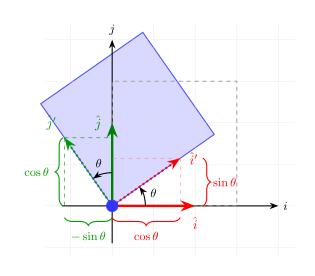
The $2 \times 2$ rotation block $\mathbf{R}$ satisfies $\mathbf{R}^T\mathbf{R} = \mathbf{I}$ and $\det\mathbf{R} = 1$ — it is orthonormal. This is precisely what guarantees that lengths and angles are preserved.
$$ \begin{bmatrix} x' \\ y' \\ 1 \end{bmatrix} = \begin{bmatrix} \color{#ef4444}\cos\theta & \color{#22c55e}-\sin\theta & \color{#3b82f6}0 \\ \color{#ef4444}\sin\theta & \color{#22c55e}\cos\theta & \color{#3b82f6}0 \\ \color{#ef4444}0 & \color{#22c55e}0 & \color{#3b82f6}1 \end{bmatrix} \begin{bmatrix} x \\ y \\ 1 \end{bmatrix} $$Adding a translation column gives the full rigid (Euclidean) transform.
- Preserves: lengths, angles, orientation.
- DoF: 3 (1 rotation angle $\theta$, 2 translations).
2D Scaling — 2 DoF
$$x' = s_x \cdot x, \qquad y' = s_y \cdot y$$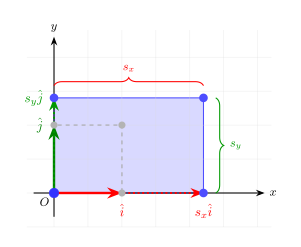
What is and isn’t preserved depends on whether the scale is uniform:
Uniform scaling ($s_x = s_y = s$): preserves angles, orientation, parallelism — but not lengths (everything scales by $s$).
Non-uniform scaling ($s_x \neq s_y$): distorts angles. Only parallelism survives in general.
DoF: 2 ($s_x$, $s_y$).
2D Affine — 6 DoF
An affine transform relaxes the orthonormality constraint on the $2 \times 2$ submatrix. The upper-left block is now any invertible $2 \times 2$ matrix. By SVD, every affine matrix decomposes into rotations and non-uniform scalings. The new operation introduced here is shearing.
$$ \begin{bmatrix} x' \\ y' \\ 1 \end{bmatrix} = \begin{bmatrix} \color{#ef4444}a_{11} & \color{#22c55e}a_{12} & \color{#3b82f6}t_x \\ \color{#ef4444}a_{21} & \color{#22c55e}a_{22} & \color{#3b82f6}t_y \\ \color{#ef4444}0 & \color{#22c55e}0 & \color{#3b82f6}1 \end{bmatrix} \begin{bmatrix} x \\ y \\ 1 \end{bmatrix} $$- Preserves: parallelism (parallel lines stay parallel; lengths and angles can change).
- DoF: 6 (four entries of $\mathbf{A}$ + $t_x$ + $t_y$).
2D Projective / Homography — 8 DoF
The final step: allow the bottom row of the matrix to take arbitrary values. The result is no longer affine — $w'$ is a non-trivial function of the input, so we must divide through by it to recover Cartesian coordinates.
$$ \begin{bmatrix} x' \\ y' \\ w' \end{bmatrix} = \begin{bmatrix} \color{#ef4444}h_{11} & \color{#22c55e}h_{12} & \color{#3b82f6}h_{13} \\ \color{#ef4444}h_{21} & \color{#22c55e}h_{22} & \color{#3b82f6}h_{23} \\ \color{#ef4444}h_{31} & \color{#22c55e}h_{32} & \color{#3b82f6}h_{33} \end{bmatrix} \begin{bmatrix} x \\ y \\ 1 \end{bmatrix}, \qquad x_{\text{out}} = \frac{x'}{w'}, \quad y_{\text{out}} = \frac{y'}{w'}$$The $9$ matrix entries have only $8$ DoF because multiplying every entry by a non-zero scalar $\lambda$ produces the same map (the $w'$-divide cancels $\lambda$).
- Preserves: straight lines (but parallel lines can converge to a vanishing point).
- DoF: 8.
Custom 2D Transform
3D Transformations
The extension to 3D is straightforward: use $4 \times 4$ matrices and four-component homogeneous coordinates $\langle x, y, z, w \rangle^T$. The point/direction semantic from the homogeneous coordinates section carries over directly: points use $w=1$, directions use $w=0$, and the same matrix form handles both correctly.
3D Translation — 3 DoF
$$ \begin{bmatrix} x' \\ y' \\ z' \\ 1 \end{bmatrix} = \begin{bmatrix} \color{#ef4444}1 & \color{#22c55e}0 & \color{#3b82f6}0 & \color{#a855f7}t_x \\ \color{#ef4444}0 & \color{#22c55e}1 & \color{#3b82f6}0 & \color{#a855f7}t_y \\ \color{#ef4444}0 & \color{#22c55e}0 & \color{#3b82f6}1 & \color{#a855f7}t_z \\ \color{#ef4444}0 & \color{#22c55e}0 & \color{#3b82f6}0 & \color{#a855f7}1 \end{bmatrix} \begin{bmatrix} x \\ y \\ z \\ 1 \end{bmatrix} $$- Preserves: lengths, angles, orientation.
- DoF: 3.
3D Rigid / Euclidean — 6 DoF
The $3 \times 3$ rotation block $\mathbf{R}$ is now orthonormal across all three axes ($\mathbf{R}^T\mathbf{R} = \mathbf{I}$, $\det\mathbf{R} = 1$), encoding pitch, yaw, and roll. It preserves lengths and angles for the same reason as in 2D: dot products are unchanged by an orthonormal matrix.
$$ \begin{bmatrix} x' \\ y' \\ z' \\ 1 \end{bmatrix} = \begin{bmatrix} \color{#ef4444}r_{11} & \color{#22c55e}r_{12} & \color{#3b82f6}r_{13} & \color{#a855f7}t_x \\ \color{#ef4444}r_{21} & \color{#22c55e}r_{22} & \color{#3b82f6}r_{23} & \color{#a855f7}t_y \\ \color{#ef4444}r_{31} & \color{#22c55e}r_{32} & \color{#3b82f6}r_{33} & \color{#a855f7}t_z \\ \color{#ef4444}0 & \color{#22c55e}0 & \color{#3b82f6}0 & \color{#a855f7}1 \end{bmatrix} \begin{bmatrix} x \\ y \\ z \\ 1 \end{bmatrix} $$- Preserves: lengths, angles, orientation.
- DoF: 6 (3 rotation angles, 3 translations).
3D Scaling — 3 DoF
$$ \begin{bmatrix} x' \\ y' \\ z' \\ 1 \end{bmatrix} = \begin{bmatrix} \color{#ef4444}s_x & \color{#22c55e}0 & \color{#3b82f6}0 & \color{#a855f7}0 \\ \color{#ef4444}0 & \color{#22c55e}s_y & \color{#3b82f6}0 & \color{#a855f7}0 \\ \color{#ef4444}0 & \color{#22c55e}0 & \color{#3b82f6}s_z & \color{#a855f7}0 \\ \color{#ef4444}0 & \color{#22c55e}0 & \color{#3b82f6}0 & \color{#a855f7}1 \end{bmatrix} \begin{bmatrix} x \\ y \\ z \\ 1 \end{bmatrix} $$- Preserves: parallelism. Angles preserved only if $s_x = s_y = s_z$.
- DoF: 3.
3D Affine — 12 DoF
$$ \begin{bmatrix} x' \\ y' \\ z' \\ 1 \end{bmatrix} = \begin{bmatrix} \color{#ef4444}a_{11} & \color{#22c55e}a_{12} & \color{#3b82f6}a_{13} & \color{#a855f7}t_x \\ \color{#ef4444}a_{21} & \color{#22c55e}a_{22} & \color{#3b82f6}a_{23} & \color{#a855f7}t_y \\ \color{#ef4444}a_{31} & \color{#22c55e}a_{32} & \color{#3b82f6}a_{33} & \color{#a855f7}t_z \\ \color{#ef4444}0 & \color{#22c55e}0 & \color{#3b82f6}0 & \color{#a855f7}1 \end{bmatrix} \begin{bmatrix} x \\ y \\ z \\ 1 \end{bmatrix} $$- Preserves: parallelism.
- DoF: 12 (nine free entries in $\mathbf{A}$ + three translations).
3D Projective — 15 DoF
When the bottom row of the $4 \times 4$ matrix takes arbitrary values, the result is a general projective transform. After multiplying a point by this matrix, we must divide all components by the resulting $w'$ to recover Cartesian coordinates. This is the same perspective divide we saw in 2D homogeneous coordinates, now in 3D.
$$ \begin{bmatrix} x' \\ y' \\ z' \\ w' \end{bmatrix} = \begin{bmatrix} \color{#ef4444}h_{11} & \color{#22c55e}h_{12} & \color{#3b82f6}h_{13} & \color{#a855f7}h_{14} \\ \color{#ef4444}h_{21} & \color{#22c55e}h_{22} & \color{#3b82f6}h_{23} & \color{#a855f7}h_{24} \\ \color{#ef4444}h_{31} & \color{#22c55e}h_{32} & \color{#3b82f6}h_{33} & \color{#a855f7}h_{34} \\ \color{#ef4444}h_{41} & \color{#22c55e}h_{42} & \color{#3b82f6}h_{43} & \color{#a855f7}h_{44} \end{bmatrix} \begin{bmatrix} x \\ y \\ z \\ 1 \end{bmatrix}, \qquad x_{\text{out}} = \frac{x'}{w'},\ y_{\text{out}} = \frac{y'}{w'},\ z_{\text{out}} = \frac{z'}{w'}$$The 16 entries have 15 DoF because scaling every entry by the same $\lambda$ yields the same map (the $w'$-divide cancels it). The perspective projection matrix we derive later in the pipeline section is one specific, carefully constructed member of this family — not a free 15-parameter matrix.
- Preserves: straight lines (parallel lines can converge at a vanishing point).
- DoF: 15.
Custom 3D Transform
Transformation Hierarchy Summary
2D
| Transform | Matrix | DoF | Preserves | Icon |
|---|---|---|---|---|
| translation | $\big[\, I \bigm| t \,\big]_{2 \times 3}$ | 2 | lengths, angles, orientation | |
| rigid (Euclidean) | $\big[\, R \bigm| t \,\big]_{2 \times 3}$ | 3 | lengths, angles, orientation | |
| affine | $\big[\, A \,\big]_{2 \times 3}$ | 6 | parallelism | |
| projective | $\big[\, \tilde{H} \,\big]_{3 \times 3}$ | 8 | straight lines |
3D
| Transform | Matrix | DoF | Preserves | Icon |
|---|---|---|---|---|
| translation | $\big[\, I \bigm| t \,\big]_{3 \times 4}$ | 3 | lengths, angles, orientation | |
| rigid (Euclidean) | $\big[\, R \bigm| t \,\big]_{3 \times 4}$ | 6 | lengths, angles, orientation | |
| affine | $\big[\, A \,\big]_{3 \times 4}$ | 12 | parallelism | |
| projective | $\big[\, \tilde{H} \,\big]_{4 \times 4}$ | 15 | straight lines |
The 3D Graphics Rendering Pipeline
With these pieces in place, we can trace a vertex all the way from an artist’s model to a screen pixel. Each stage is still just a matrix multiplication; the GPU applies the same sequence to every vertex in parallel.
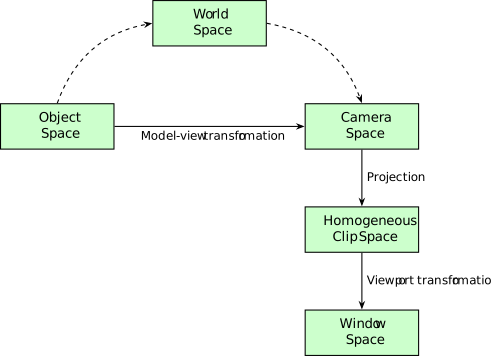
Object Space (Local Space)
Each 3D model is authored in its own coordinate frame, with the origin typically at the model’s geometric center. A cube, a sphere, and a character mesh all live in their own isolated local universes.
Each object considers itself centered at its own origin, regardless of where it will end up in the scene.
World Space
We assemble the scene by applying each object’s Model Matrix $\mathbf{M}_\text{model}$ — a rigid or affine transform encoding that object’s scale, rotation, and position in the world.
The order matters: Scale → Rotate → Translate (applied right-to-left in matrix notation: $\mathbf{T} \cdot \mathbf{R} \cdot \mathbf{S}$). Translating before rotating would orbit the object around the world origin rather than spinning it in place.
Scale → Rotate → Translate. Reversing this order produces different results.
All objects share one World Space. A camera object is placed here too, defining the viewpoint.
Camera Space (Eye Space / View Space)
To render the scene from the camera’s point of view, we transform the entire world so that the camera sits at the origin, looking down the $-Z$ axis, with $+Y$ pointing up. This is Camera Space (also called Eye Space or View Space).
The transform that does this is the View Matrix $\mathbf{M}_\text{view}$ — a rigid Euclidean transform (rotation + translation). The camera itself doesn’t move; the world is repositioned around it.
Translating the camera forward is mathematically identical to translating the entire world backward. The camera is always at the origin in Camera Space.
Sign Convention Used Throughout This Post
We follow the OpenGL right-handed Camera Space convention:
- Camera at origin, looking down $-Z$.
- $+X$ points right, $+Y$ points up.
- $n$ and $f$ are positive scalars representing distances from the camera to the near and far planes. In Camera Space coordinates, those planes sit at $z = -n$ and $z = -f$.
Every projection matrix in the rest of this post uses this convention consistently.
Building the View Matrix: LookAt
Specifying the camera via Euler angles (yaw/pitch/roll) is error-prone and suffers from gimbal lock. The LookAt construction is more intuitive. It takes three inputs:
- Eye $\mathbf{e}$: camera position in World Space.
- Target $\mathbf{t}$: the point the camera looks at.
- World Up $\mathbf{u}_\text{world}$: a reference “up” direction, typically $(0,1,0)$.
From these we build an orthonormal basis for the camera’s local frame:
Geometrically, this is just “make three perpendicular arrows.” The vector $\mathbf{f}$ points from the eye to the target, so it fixes where the camera looks. The cross product $\mathbf{f}\times\mathbf{u}_\text{world}$ gives a vector perpendicular to both the viewing direction and the approximate world-up direction; that is the camera’s right axis. Crossing right with forward gives the corrected up axis. This last step matters because the supplied world-up vector is usually only a hint — if the camera is pitched or rolled, it is not exactly perpendicular to the viewing direction.
The View Matrix is the inverse of the camera’s own World-Space transform. Because the rotation part is orthonormal, its inverse is its transpose. The translation inverts via dot products with the eye position:
$$ \mathbf{M}_\text{view} = \begin{bmatrix} \color{#ef4444}r_x & \color{#ef4444}r_y & \color{#ef4444}r_z & \color{#a855f7}-\mathbf{r} \cdot \mathbf{e} \\ \color{#22c55e}u_x & \color{#22c55e}u_y & \color{#22c55e}u_z & \color{#a855f7}-\mathbf{u} \cdot \mathbf{e} \\ \color{#3b82f6}-f_x & \color{#3b82f6}-f_y & \color{#3b82f6}-f_z & \color{#a855f7}\mathbf{f} \cdot \mathbf{e} \\ \color{#ef4444}0 & \color{#22c55e}0 & \color{#3b82f6}0 & \color{#a855f7}1 \end{bmatrix} $$The third row negates $\mathbf{f}$ because the camera looks down $-Z$: we want $+Z$ in Camera Space to point behind the camera.
Homogeneous Clip Space
After Camera Space, the Projection Matrix $\mathbf{M}_\text{proj}$ maps the view volume to a canonical cube, called Clip Space. The GPU then clips geometry against this cube. Two projection types are in common use.
One important OpenGL detail is that clipping happens before the perspective divide. A clip-space vertex $(x_c, y_c, z_c, w_c)$ survives only if:
$$-\color{#a855f7}{w_c} \le \color{#ef4444}{x_c} \le \color{#a855f7}{w_c}, \qquad -\color{#a855f7}{w_c} \le \color{#22c55e}{y_c} \le \color{#a855f7}{w_c}, \qquad -\color{#a855f7}{w_c} \le \color{#3b82f6}{z_c} \le \color{#a855f7}{w_c}$$Only after this test does the GPU divide by $w_c$ to produce NDC:
$$\color{#ef4444}{x_\text{ndc}} = \frac{\color{#ef4444}{x_c}}{\color{#a855f7}{w_c}}, \qquad \color{#22c55e}{y_\text{ndc}} = \frac{\color{#22c55e}{y_c}}{\color{#a855f7}{w_c}}, \qquad \color{#3b82f6}{z_\text{ndc}} = \frac{\color{#3b82f6}{z_c}}{\color{#a855f7}{w_c}}$$Orthographic Projection
An orthographic (parallel) projection has no perspective effect — objects do not appear smaller with distance. It is used for technical drawings, isometric games, and UI rendering.
The view volume is a rectangular box bounded by left ($l$), right ($r$), bottom ($b$), top ($t$), near ($n$), and far ($f$). In Camera Space the box spans $[l, r] \times [b, t] \times [-f, -n]$ (note: the near and far planes sit at negative $z$ because the camera looks down $-Z$, and $n, f > 0$).
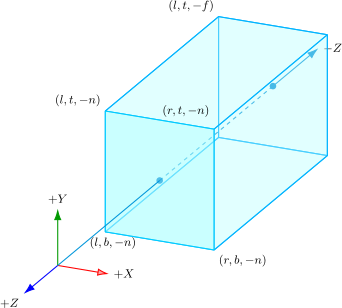
The goal is to map this box to the NDC cube $[-1, 1]^3$. Each coordinate is just an affine map between two intervals:
$$ \begin{aligned} \color{#ef4444}{x_\text{ndc}} &= \frac{2}{r-l}\color{#ef4444}{x} - \frac{r+l}{r-l} \qquad && [l, r] \to [-1, 1] \\ \color{#22c55e}{y_\text{ndc}} &= \frac{2}{t-b}\color{#22c55e}{y} - \frac{t+b}{t-b} \qquad && [b, t] \to [-1, 1] \\ \color{#3b82f6}{z_\text{ndc}} &= -\frac{2}{f-n}\color{#3b82f6}{z} - \frac{f+n}{f-n} \qquad && -n \to -1,\; -f \to +1 \end{aligned} $$The negative coefficient on $z$ is not a typo: in OpenGL Camera Space, the near plane is at $z=-n$ and the far plane is at $z=-f$, but OpenGL NDC stores near as $-1$ and far as $+1$.
The same result can be viewed geometrically as a translate-then-scale operation:
Step 1 — Translate the box center to the origin. The center is at $\bigl(\frac{r+l}{2},\, \frac{t+b}{2},\, \frac{-f-n}{2}\bigr)$:
$$ \mathbf{T} = \begin{bmatrix} \color{#ef4444}1 & \color{#22c55e}0 & \color{#3b82f6}0 & \color{#a855f7}-\frac{r+l}{2} \\ \color{#ef4444}0 & \color{#22c55e}1 & \color{#3b82f6}0 & \color{#a855f7}-\frac{t+b}{2} \\ \color{#ef4444}0 & \color{#22c55e}0 & \color{#3b82f6}1 & \color{#a855f7}\frac{f+n}{2} \\ \color{#ef4444}0 & \color{#22c55e}0 & \color{#3b82f6}0 & \color{#a855f7}1 \end{bmatrix} $$Step 2 — Scale to fit the NDC cube (side length 2). The depth axis also gets negated so that $z = -n$ maps to $-1$ and $z = -f$ maps to $+1$ (i.e. near maps to NDC $-1$, far to NDC $+1$):
$$ \mathbf{S} = \begin{bmatrix} \color{#ef4444}\frac{2}{r-l} & \color{#22c55e}0 & \color{#3b82f6}0 & \color{#a855f7}0 \\ \color{#ef4444}0 & \color{#22c55e}\frac{2}{t-b} & \color{#3b82f6}0 & \color{#a855f7}0 \\ \color{#ef4444}0 & \color{#22c55e}0 & \color{#3b82f6}\frac{-2}{f-n} & \color{#a855f7}0 \\ \color{#ef4444}0 & \color{#22c55e}0 & \color{#3b82f6}0 & \color{#a855f7}1 \end{bmatrix} $$Combining as $\mathbf{M}_\text{ortho} = \mathbf{S} \cdot \mathbf{T}$:
$$ \mathbf{M}_\text{ortho} = \begin{bmatrix} \color{#ef4444}\frac{2}{r-l} & \color{#22c55e}0 & \color{#3b82f6}0 & \color{#a855f7}-\frac{r+l}{r-l} \\ \color{#ef4444}0 & \color{#22c55e}\frac{2}{t-b} & \color{#3b82f6}0 & \color{#a855f7}-\frac{t+b}{t-b} \\ \color{#ef4444}0 & \color{#22c55e}0 & \color{#3b82f6}\frac{-2}{f-n} & \color{#a855f7}-\frac{f+n}{f-n} \\ \color{#ef4444}0 & \color{#22c55e}0 & \color{#3b82f6}0 & \color{#a855f7}1 \end{bmatrix} $$Because this is an affine transform, $w' = 1$ throughout — no perspective divide is needed. The output is already in NDC.
The orthographic projection maps the box-shaped view volume uniformly to the NDC cube. No perspective distortion: a cube 10 m away looks identical to one at 1 m.
Perspective Projection
In a perspective projection, objects shrink as they recede — just as in a photograph. This is the correct model for a pinhole camera and the standard for 3D games and film.
Orthographic projection was a box-to-box mapping. Perspective projection has one extra job first: turn a frustum into a box while preserving the illusion that farther objects project smaller.
The View Frustum
The visible region is a truncated pyramid called the view frustum. It is bounded by six planes: near, far, left, right, top, and bottom. Everything outside the frustum is clipped; everything inside is rasterized.
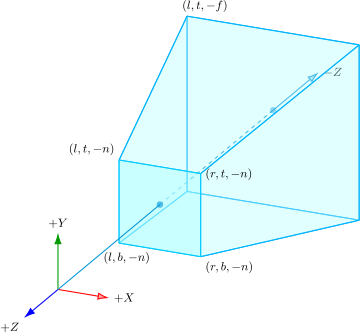
The frustum parameters $l,r,b,t$ are measured on the near plane, not the far plane. Because every side of the frustum is a ray from the camera origin, the cross-section grows linearly with distance. At a positive camera distance $d=-z$:
$$ x \in \left[\frac{d}{n}l,\; \frac{d}{n}r\right], \qquad y \in \left[\frac{d}{n}b,\; \frac{d}{n}t\right] $$So at the far plane $(d=f)$, the bounds are scaled by $f/n$. This depth-dependent width is exactly what makes perspective projection non-affine.
Field of View and Focal Length
Field of view is a friendlier way to specify the same frustum. The horizontal field of view $\alpha$ controls the left/right opening, and the vertical field of view $\beta$ controls the top/bottom opening.
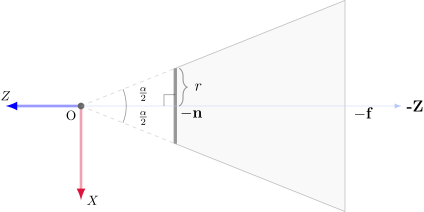
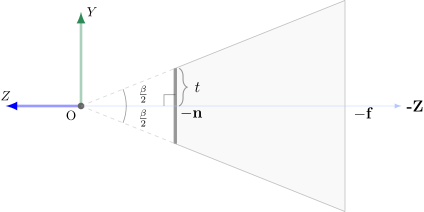
For a centered, symmetric frustum:
$$ r = n\tan(\alpha/2), \qquad l=-r $$$$ t = n\tan(\beta/2), \qquad b=-t $$If the viewport aspect ratio is $a=W/H$, then $a=r/t$. So if you start with horizontal FoV, $t=r/a$; if you start with vertical FoV, $r=at$.
The dimensionless focal scale used by the projection matrix is the near distance divided by the near-plane half-size:
$$ e_x=\frac{n}{r}=\frac{1}{\tan(\alpha/2)}, \qquad e_y=\frac{n}{t}=\frac{1}{\tan(\beta/2)} $$Larger FoV means a smaller focal scale, which makes the image wider. These focal scales are not the near plane distance $n$ or far plane distance $f$; they are the $x$ and $y$ scale factors that appear in the symmetric projection matrix.
Similar Triangles: Why Perspective Divides by Depth
Take a Camera-Space point $(x,y,z)$ with $z<0$. Project it along the ray from the camera origin onto the near plane $z=-n$. The side and top views are the same argument in two different planes.
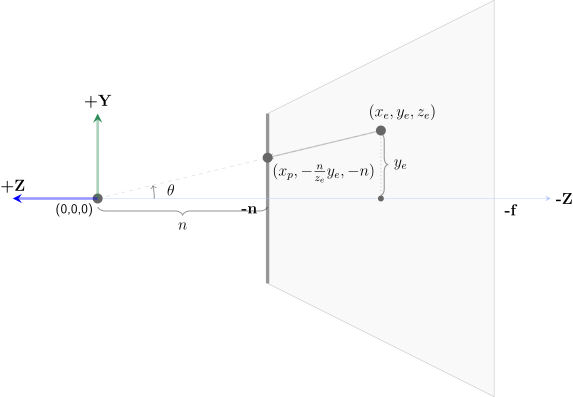
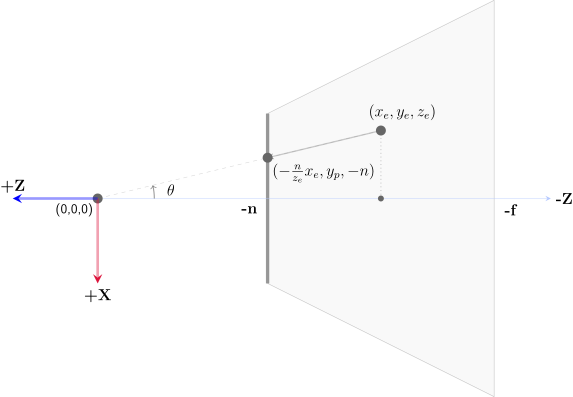
The projected near-plane coordinates are:
$$ x_p = \frac{-n}{z}x = \frac{nx}{-z}, \qquad y_p = \frac{-n}{z}y = \frac{ny}{-z} $$The sign is easy to trip over. Visible points have $z<0$, while $n$ is a positive distance. The distance from the camera to the point is therefore $-z$, not $z$. That is why the scale factor is $n/(-z)$: it is “near-plane distance divided by point distance.”
That $-z$ in the denominator is the heart of perspective: as a point moves farther away, $|z|$ grows, and its projected coordinates move closer to the center.
Deriving the Perspective Projection Matrix
We build $\mathbf{M}_\text{proj}$ in two conceptual stages. This section constructs the clip-space coordinates; the next section performs the final perspective divide into NDC.
Stage 1 — The “unhinging” matrix $\mathbf{M}_\text{persp}$.
We want a matrix that turns the frustum into an orthographic box with bounds $[l,r]\times[b,t]\times[-f,-n]$ after the perspective divide. Start with this unknown-coefficient unhinging matrix:
$$ \mathbf{M}_\text{persp}(A,B)= \begin{bmatrix} \color{#ef4444}n & \color{#22c55e}0 & \color{#3b82f6}0 & \color{#a855f7}0 \\ \color{#ef4444}0 & \color{#22c55e}n & \color{#3b82f6}0 & \color{#a855f7}0 \\ \color{#ef4444}0 & \color{#22c55e}0 & \color{#3b82f6}A & \color{#a855f7}B \\ \color{#ef4444}0 & \color{#22c55e}0 & \color{#3b82f6}-1 & \color{#a855f7}0 \end{bmatrix} $$Applied to a Camera-Space point $(x,y,z,1)^T$, it produces:
$$ \begin{bmatrix} \color{#ef4444}x_u \\ \color{#22c55e}y_u \\ \color{#3b82f6}z_u \\ \color{#a855f7}w_u \end{bmatrix}= \begin{bmatrix} \color{#ef4444}nx \\ \color{#22c55e}ny \\ \color{#3b82f6}Az+B \\ \color{#a855f7}-z \end{bmatrix} $$The similar-triangle result tells us what the first two divided coordinates must be:
$$ \frac{x_u}{w_u} = \frac{nx}{-z}, \qquad \frac{y_u}{w_u} = \frac{ny}{-z} $$The first, second, and fourth rows above make that happen automatically:
$$ \color{#ef4444}{x_u}=nx, \qquad \color{#22c55e}{y_u}=ny, \qquad \color{#a855f7}{w_u}=-z $$Now we solve the remaining $z_u$ row. If we simply used $z_u=z$, the divide by $-z$ would destroy depth. Instead, keep the linear numerator from the unknown matrix:
$$ \color{#3b82f6}{z_u}=Az+B, \qquad \frac{\color{#3b82f6}{z_u}}{\color{#a855f7}{w_u}}=\frac{Az+B}{-z} $$The unhinged box should keep the near plane at $z=-n$ and the far plane at $z=-f$, because Stage 2 will reuse the orthographic matrix derived above. So impose:
$$ z=-n \Rightarrow \frac{Az+B}{-z}=-n, \qquad z=-f \Rightarrow \frac{Az+B}{-z}=-f $$These become:
$$ -An+B=-n^2, \qquad -Af+B=-f^2 $$Solving gives:
$$A=n+f,\qquad B=nf$$So the unhinging matrix is:
$$ \mathbf{M}_\text{persp} = \begin{bmatrix} \color{#ef4444}n & \color{#22c55e}0 & \color{#3b82f6}0 & \color{#a855f7}0 \\ \color{#ef4444}0 & \color{#22c55e}n & \color{#3b82f6}0 & \color{#a855f7}0 \\ \color{#ef4444}0 & \color{#22c55e}0 & \color{#3b82f6}n+f & \color{#a855f7}nf \\ \color{#ef4444}0 & \color{#22c55e}0 & \color{#3b82f6}-1 & \color{#a855f7}0 \end{bmatrix} $$Multiplying a Camera-Space point $(x, y, z, 1)^T$ through gives:
$$\begin{bmatrix} \color{#ef4444}nx \\ \color{#22c55e}ny \\ \color{#3b82f6}(n+f)z + nf \\ \color{#a855f7}-z \end{bmatrix}$$After dividing by $w_u=-z$, the frustum has become an orthographic box:
$$ \color{#ef4444}{x} \to \frac{nx}{-z}, \qquad \color{#22c55e}{y} \to \frac{ny}{-z}, \qquad \color{#3b82f6}{z} \to \frac{(n+f)z+nf}{-z} $$Check the depth endpoints:
$$ \color{#3b82f6}{z=-n} \Rightarrow \frac{(n+f)(-n)+nf}{n}=-n, \qquad \color{#3b82f6}{z=-f} \Rightarrow \frac{(n+f)(-f)+nf}{f}=-f $$This confirms that $\mathbf{M}_\text{persp}$ is correct for the two-stage construction. It is not the final OpenGL projection matrix yet; it is the projective warp that prepares the frustum for an orthographic remap.
Stage 2 — Apply the orthographic matrix.
The unhinging warp has produced the same box that the orthographic matrix expects: $[l,r]\times[b,t]\times[-f,-n]$. Therefore:
$$\mathbf{M}_\text{proj} = \mathbf{M}_\text{ortho} \cdot \mathbf{M}_\text{persp}$$In the actual GPU pipeline these multiply into one matrix first, and the hardware performs one perspective divide afterward. The two-stage story is just a derivation tool.
Working the product out:
$$ \mathbf{M}_\text{proj} = \begin{bmatrix} \color{#ef4444}\frac{2n}{r-l} & \color{#22c55e}0 & \color{#3b82f6}\frac{r+l}{r-l} & \color{#a855f7}0 \\ \color{#ef4444}0 & \color{#22c55e}\frac{2n}{t-b} & \color{#3b82f6}\frac{t+b}{t-b} & \color{#a855f7}0 \\ \color{#ef4444}0 & \color{#22c55e}0 & \color{#3b82f6}-\frac{f+n}{f-n} & \color{#a855f7}-\frac{2fn}{f-n} \\ \color{#ef4444}0 & \color{#22c55e}0 & \color{#3b82f6}-1 & \color{#a855f7}0 \end{bmatrix} $$For a symmetric frustum ($r = -l$, $t = -b$), the off-diagonal entries in column 3 vanish and the matrix simplifies to the familiar glm::perspective form.
Substituting the horizontal FoV extents from above, and writing $e=e_x=1/\tan(\alpha/2)$, gives:
$$ \frac{n}{r} = \frac{1}{\tan(\alpha/2)} = e, \qquad \frac{n}{t} = \frac{a}{\tan(\alpha/2)} = ae $$So the horizontal FoV form has $e$ in the $x$ scale entry and $ae$ in the $y$ scale entry. If you start from a vertical FoV instead, $1/\tan(\beta/2)$ appears in the $y$ scale entry and is divided by the aspect ratio for $x$.
The pyramid frustum warps into the NDC cube. Geometry far from the camera is compressed more than nearby geometry — this is foreshortening.
Note on the interactive. The widget above shows Camera-Space $z$-values as signed coordinates (near plane at $z = -3$, far plane at $z = -13$), consistent with the OpenGL convention and the derivation above.
Normalized Device Coordinates (NDC)
After the perspective divide ($x_\text{ndc} = x'/w'$, $y_\text{ndc} = y'/w'$, $z_\text{ndc} = z'/w'$), all visible geometry occupies the unit cube $[-1, 1]^3$. This space is device-independent: NDC coordinates map to pixels the same way regardless of screen resolution.
For perspective projection, the divide is the moment where the clip-space bookkeeping becomes actual screen-like coordinates. From the matrix above, a Camera-Space point $(x,y,z,1)^T$ produces:
$$ \begin{aligned} \color{#ef4444}{x_c} &= \frac{2n}{r-l}x + \frac{r+l}{r-l}z \\ \color{#22c55e}{y_c} &= \frac{2n}{t-b}y + \frac{t+b}{t-b}z \\ \color{#3b82f6}{z_c} &= -\frac{f+n}{f-n}z - \frac{2fn}{f-n} \\ \color{#a855f7}{w_c} &= -z \end{aligned} $$The perspective divide turns those clip coordinates into:
$$ \begin{aligned} \color{#ef4444}{x_\text{ndc}} &= \frac{\color{#ef4444}{x_c}}{\color{#a855f7}{w_c}} = \frac{\frac{2n}{r-l}x + \frac{r+l}{r-l}z}{-z} = -\frac{2nx}{(r-l)z} - \frac{r+l}{r-l} \\ \color{#22c55e}{y_\text{ndc}} &= \frac{\color{#22c55e}{y_c}}{\color{#a855f7}{w_c}} = \frac{\frac{2n}{t-b}y + \frac{t+b}{t-b}z}{-z} = -\frac{2ny}{(t-b)z} - \frac{t+b}{t-b} \\ \color{#3b82f6}{z_\text{ndc}} &= \frac{\color{#3b82f6}{z_c}}{\color{#a855f7}{w_c}} = \frac{-\frac{f+n}{f-n}z - \frac{2fn}{f-n}}{-z} = \frac{f+n}{f-n} + \frac{2fn}{(f-n)z} \end{aligned} $$The $x$ and $y$ equations are perspective foreshortening: both contain division by Camera-Space depth $z$. Since visible points have $z<0$, farther points have larger $|z|$, so their projected $x$ and $y$ values move closer to the center of the image.
The depth equation is the important one for the Z-buffer. If we write positive camera distance as $D=-z$, then:
$$\color{#3b82f6}{z_\text{ndc}}(D) = \frac{f+n}{f-n} - \frac{2fn}{(f-n)D}$$This maps the near and far planes correctly:
$$ D=n \Rightarrow \color{#3b82f6}{z_\text{ndc}}=-1, \qquad D=f \Rightarrow \color{#3b82f6}{z_\text{ndc}}=+1 $$But it is not linear in distance; it is linear in $1/D$. Its slope with respect to distance $D$ is:
$$\frac{\mathrm{d}\,\color{#3b82f6}{z_\text{ndc}}}{\mathrm{d}D} = \frac{2fn}{(f-n)D^2}$$So the mapping changes rapidly near the camera and slowly far away. This is why the depth buffer gets much more precision near the near plane than near the far plane.
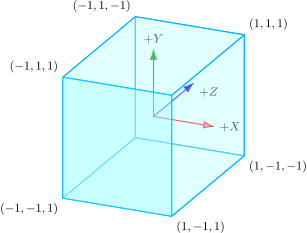
The interactive below shows this compression directly: evenly spaced planes in Camera Space bunch up after projection. Objects far away share a tiny slice of the depth range, causing Z-fighting (flickering between nearly coplanar surfaces). The practical fix is to push the near plane $n$ as far forward as your scene allows — halving $n$ roughly halves the Z-buffer precision available for distant objects.
Five evenly-spaced depth planes in Camera Space become unevenly-spaced planes in NDC. The compression accelerates toward the far plane.
Window Space
The Viewport Transform maps NDC to pixel coordinates. This is another set of line maps. For:
glViewport(X, Y, W, H)
glDepthRange(N, F)
the interval endpoints are:
$$ [-1, 1] \to [X, X+W], \qquad [-1, 1] \to [Y, Y+H], \qquad [-1, 1] \to [N, F] $$Solving $u_\text{out} = au_\text{ndc} + b$ for each axis gives:
$$ \color{#ef4444}{x_w} = \frac{W}{2}\color{#ef4444}{x_\text{ndc}} + X + \frac{W}{2}, \qquad \color{#22c55e}{y_w} = \frac{H}{2}\color{#22c55e}{y_\text{ndc}} + Y + \frac{H}{2} $$$$ \color{#3b82f6}{z_w} = \frac{F-N}{2}\color{#3b82f6}{z_\text{ndc}} + \frac{F+N}{2} $$For the common default viewport origin $(X,Y)=(0,0)$ and depth range $[N,F]=[0,1]$, this reduces to:
$$\color{#ef4444}{x_\text{px}} = \frac{W}{2}(\color{#ef4444}{x_\text{ndc}} + 1), \qquad \color{#22c55e}{y_\text{px}} = \frac{H}{2}(\color{#22c55e}{y_\text{ndc}} + 1), \qquad \color{#3b82f6}{z_w} = \frac{\color{#3b82f6}{z_\text{ndc}}+1}{2}$$As a homogeneous matrix, the full viewport transform is:
$$ \mathbf{M}_\text{viewport} = \begin{bmatrix} \color{#ef4444}\frac{W}{2} & \color{#22c55e}0 & \color{#3b82f6}0 & \color{#a855f7}X+\frac{W}{2} \\ \color{#ef4444}0 & \color{#22c55e}\frac{H}{2} & \color{#3b82f6}0 & \color{#a855f7}Y+\frac{H}{2} \\ \color{#ef4444}0 & \color{#22c55e}0 & \color{#3b82f6}\frac{F-N}{2} & \color{#a855f7}\frac{F+N}{2} \\ \color{#ef4444}0 & \color{#22c55e}0 & \color{#3b82f6}0 & \color{#a855f7}1 \end{bmatrix} $$The depth value $z_w$ is what the Z-buffer stores for depth testing during rasterization.
The full pipeline is the MVP transform:
$$\mathbf{v}_\text{clip} = \underbrace{\color{#3b82f6}{\mathbf{M}_\text{proj}}}_{\text{Projection}} \cdot \underbrace{\color{#22c55e}{\mathbf{M}_\text{view}} \cdot \color{#ef4444}{\mathbf{M}_\text{model}}}_{\text{Model-View}} \cdot \mathbf{v}_\text{object}$$The complete MVP pipeline. Each stage is one matrix multiply on the GPU, applied to every vertex in parallel.
Two Ways to Render a Scene
Everything up to this point has been object-space / rasterization thinking: we iterate over geometry and ask where each triangle lands on the screen. The GPU does this in parallel for every vertex, clipping and filling pixels as it goes. It is extremely fast, which is why it dominates real-time graphics.
But there is a second, equally valid question you can ask: starting from a pixel on the screen, what does the camera actually see through it? This is image-space / ray casting thinking. Instead of pushing geometry forward into screen space, we pull a ray backward from the pixel into the scene and find whatever it hits first. The two viewpoints are complementary: rasterization tells us where a surface lands on the image plane, while primary-ray methods ask which surface sits along each pixel’s line of sight. The rest of this post moves from the first view to the second.
Generating Primary Rays
Next, we switch to a different way of rendering. Instead of projecting objects onto a 2D screen, we trace rays to determine the pixel color. Before the ray-casting algorithm itself, though, we need a basic definition of a ray.
Ray
A ray is a parametric line defined by an origin $\mathbf{o}$ and a direction $\mathbf{d}$:
$$\mathbf{r}(t) = \mathbf{o} + t\mathbf{d}$$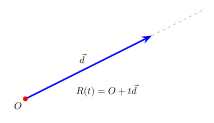
Primary Ray Generation
Now that we know how to define a ray, for ray casting algorithms we will need to define a ray (or multiple rays) for a pixel. We can visualize the rays being generated from camera origin and passing through the image plane to the scene. These rays are called primary rays. We will see how to render an image using these later, for now, we will focus on generating these rays.
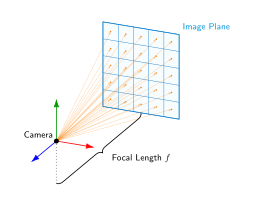
Assume the objects already live in World Space, and generate rays in Camera Space before transforming them back into World Space. As before, we use the lookAt construction to build the camera transform.
- Eye $\mathbf{e}$: camera position in World Space.
- Target $\mathbf{t}$: the point the camera looks at.
- World Up $\mathbf{u}_\text{world}$: a reference “up” direction, typically $(0,1,0)$.
From these we build an orthonormal basis for the camera’s local frame:
We will use this $M_{camera}$ matrix to transform these rays into the world space. For generating the rays we will use the pixel index.
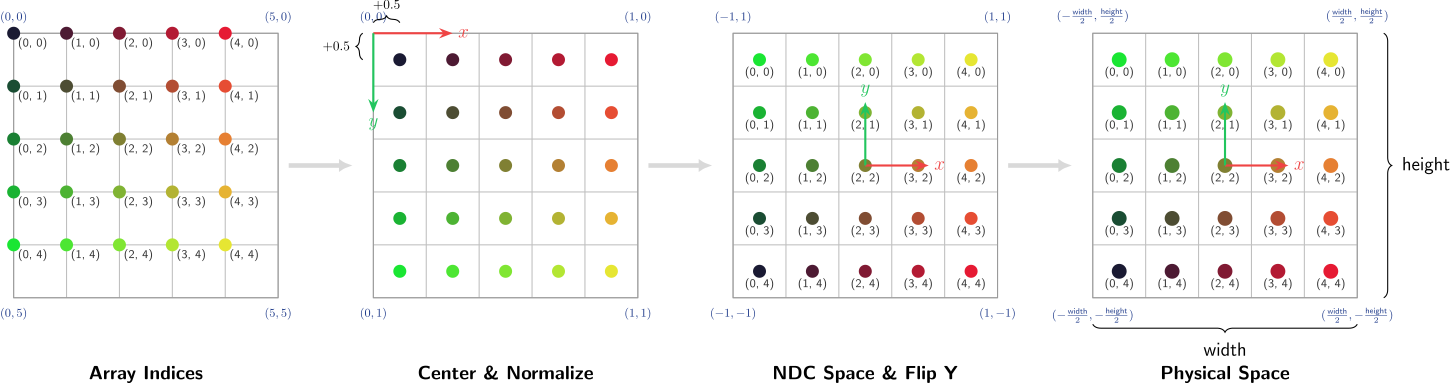
Ray Generation Code
DrJit ray generation code
The following Python code shows how we can implement a
cameraclass in order to create rays:The code below uses drjit, the same array library that powers the Mitsuba renderer.
import math
import drjit as dr

# can switch between 'cuda' or 'llvm'
from drjit.cuda import Float, Int, Array3f, Matrix3f

class Ray:
    def __init__(self, origin, direction):
        self.o = origin
        self.d = direction

class Camera:
    def __init__(self, pos, target, fov, aspect=None, H=800, W=800):
        self.pos = Array3f(*pos)
        self.target = Array3f(*target)
        self.world_up = Array3f(0, 1, 0)
        self.fov = fov
        self.aspect = aspect if aspect is not None else W / H
        self.H = H
        self.W = W
        self.f = 1.0

    def lookAt(self):
        forward = dr.normalize(self.target - self.pos)
        right = dr.normalize(dr.cross(forward, self.world_up))
        up = dr.normalize(dr.cross(right, forward))

        M_cam = Matrix3f(right, up, -forward)
        return M_cam


    def rays(self):

        # Generate 1D pixel indices
        num_pixels = self.H * self.W
        idx = dr.arange(Int, num_pixels)

        # Generate the indices of pixels as (x, y)
        x_ind = idx % self.W
        y_ind = idx // self.W

        # Scale to [0, 1] range with +0.5 to reach center
        # or change 0.5 to randomness in [0, 1] to jitter within pixel
        x_center = (Float(x_ind) + 0.5) / self.W
        y_center = (Float(y_ind) + 0.5) / self.H

        xs = x_center * 2.0 - 1.0
        ys = y_center * -2.0 + 1.0

        # Get the height and width in physical units
        # tan(beta / 2) = height /2 * f
        height = 2.0 * self.f * math.tan(math.radians(self.fov) / 2.0)
        width = height * self.aspect

        # Scale to [-width/2, width/2] x [-height/2, height/2]
        px = xs * (width / 2.0)
        py = ys * (height / 2.0)

        # Create the Camera-to-World transformation matrix.
        M_cam = self.lookAt()

        # Pack the camera-space ray directions into an Array3f
        dirs_cam = Array3f(px, py, -self.f)

        # 5. Matrix multiplication (Matrix @ Vector)
        rd = M_cam @ dirs_cam
        rd = dr.normalize(rd) # normalize the ray direction

        ro = self.pos

        return Ray(ro, rd) # Convert to Ray class and return
For the glsl shader, the pixel coordinate itself comes from gl_FragCoord. Dividing by u_resolution.y keeps the field of view stable while correcting the aspect ratio:
(We can also see the color of pixels in Fig. is same as the image formed)
The Simplified Camera Shortcut
For the rest of the GLSL examples in this post, we will use a common “shortcut”. Because the camera stays at the origin
vec3(0,0,0)(or is shifted only along the Z-axis without rotation) and always looks straight down the $-Z$ axis, theM_cammatrix is simply the identity matrix.This means we can skip the matrix multiplication entirely and construct our ray direction directly from the pixel coordinates:
vec2 uv = (gl_FragCoord.xy - 0.5 * u_resolution.xy) / u_resolution.y;
vec3 ro = vec3(0.0, 0.0, 3.0);       // Shifted back slightly, but not rotated
vec3 rd = normalize(vec3(uv, -1.0)); // Direct to world-space!
Anti-Aliasing
Sampling only the pixel center is simple, but it aliases hard edges. The jaggies (also called staircase artifacts) are clearly visible in the polygon render. Ideally, we want the average colors of objects within the pixel area. A common fix is to take several samples at slightly perturbed positions inside the pixel and average the results (A Monte Carlo estimate of the weighted area integration):
$$ \mathbf{d}_i=\mathrm{normalize}\!\left(u+\Delta u_i,\;v+\Delta v_i,\;-1\right), \qquad \mathbf{C}_\text{pixel}=\frac{1}{N}\sum_{i=1}^{N}\mathbf{C}(\mathbf{d}_i) $$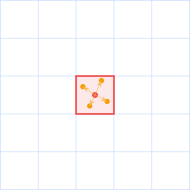
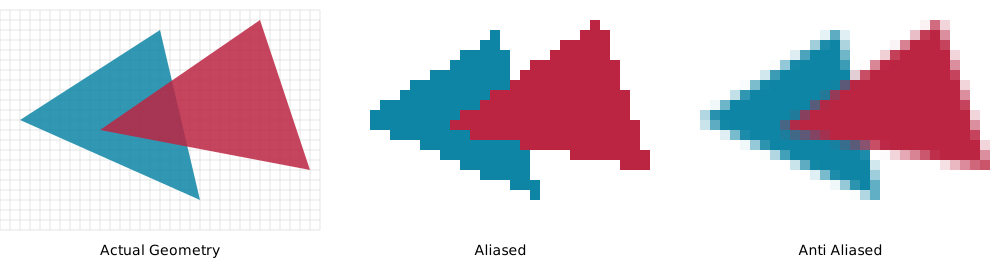
In a production renderer those offsets are usually stratified, blue-noise, or accumulated over many frames. For this introductory shader, one center ray is enough to keep the moving parts visible.
Geometry Representations and Intersections
Once we have rays shooting into our scene, the immediate next question is: how is the scene represented? Based on how we define our geometry, the intersection logic—whether we compute exact intersections or iteratively sample along the ray—will fundamentally change.
In computer graphics, geometry is typically represented in three main ways:
- Analytic primitives such as spheres, planes, and cylinders are defined by exact mathematical equations. Their intersections usually have closed-form algebraic solutions. While they are lightning-fast to intersect, they are not very flexible for modeling complex real-world objects.
- Triangles (Explicit Geometry) are the fundamental building blocks of 3D graphics. They are explicit surface primitives that can approximate any shape. They are widely used in rasterization because they project cleanly to screen space, but ray tracers also intersect them directly using highly optimized ray-triangle tests.
- Signed Distance Functions (Implicit Geometry) are continuous mathematical fields. Instead of storing a mesh of explicit vertices, an SDF returns the shortest distance from any point in space to the nearest surface. It returns a positive value outside the object, zero exactly on the surface, and a negative value inside. Intersecting with an SDF is done through an iterative process called ray marching, as there is no explicit surface to algebraically intersect with.
Let’s dive into the mathematics and code for each of these representations.
1. Ray-Sphere Intersection
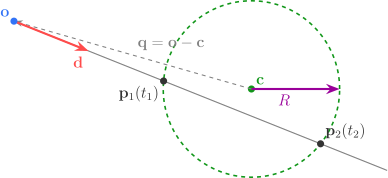
A sphere is one of the simplest analytic primitives to intersect. It is defined by its center point ${\color{#109618}\mathbf{c}}$ and its radius ${\color{#990099}R}$. Any point $\mathbf{p}$ on the surface of the sphere satisfies the equation:
$$ \|\mathbf{p} - {\color{#109618}\mathbf{c}}\|^2 = {\color{#990099}R}^2 $$We want to find if our ray ever reaches a point $\mathbf{p}$ that satisfies this equation. Recall our ray equation, defined by an origin ${\color{#3273F6}\mathbf{o}}$ and a normalized direction ${\color{#FF4B4B}\mathbf{d}}$:
$$ \mathbf{p} = {\color{#3273F6}\mathbf{o}} + t{\color{#FF4B4B}\mathbf{d}} $$To find the intersection, we simply substitute the ray equation into the sphere equation:
$$ \| ({\color{#3273F6}\mathbf{o}} + t{\color{#FF4B4B}\mathbf{d}}) - {\color{#109618}\mathbf{c}} \|^2 = {\color{#990099}R}^2 $$To make the math cleaner, let $\mathbf{q} = {\color{#3273F6}\mathbf{o}} - {\color{#109618}\mathbf{c}}$ (the vector from the sphere’s center to the ray’s origin). Expanding the squared magnitude (which is the dot product of the vector with itself) gives us a classic quadratic equation in terms of $t$:
$$ ({\color{#FF4B4B}\mathbf{d}} \cdot {\color{#FF4B4B}\mathbf{d}})t^2 + 2(\mathbf{q} \cdot {\color{#FF4B4B}\mathbf{d}})t + (\mathbf{q} \cdot \mathbf{q} - {\color{#990099}R}^2) = 0 $$This is in the standard quadratic form $At^2 + Bt + C = 0$, where:
- $A = {\color{#FF4B4B}\mathbf{d}} \cdot {\color{#FF4B4B}\mathbf{d}}$ (If our ray direction is normalized, $A = 1$)
- $B = 2(\mathbf{q} \cdot {\color{#FF4B4B}\mathbf{d}})$
- $C = \mathbf{q} \cdot \mathbf{q} - {\color{#990099}R}^2$
Using the quadratic formula $t = \frac{-B \pm \sqrt{B^2 - 4AC}}{2A}$, we can find the roots.
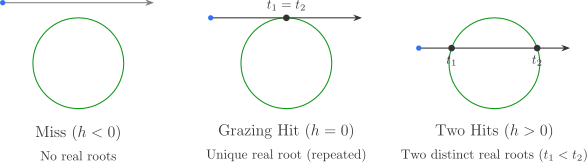
- If the discriminant ($B^2 - 4AC$) is negative, the ray misses the sphere.
- If it is zero, the ray grazes the sphere (one hit).
- If it is positive, the ray goes through the sphere (two hits). The smallest positive root $t$ is our first visible hit.
Once we find the hit distance $t$, the hit point is $\mathbf{p} = {\color{#3273F6}\mathbf{o}} + t{\color{#FF4B4B}\mathbf{d}}$, and the surface normal is simply the normalized vector from the center to the hit point: $\mathbf{n} = (\mathbf{p} - {\color{#109618}\mathbf{c}}) / {\color{#990099}R}$.
2. Ray-Triangle Intersection (Möller-Trumbore)
Triangles are the backbone of 3D modeling. Let a triangle be defined by its three vertices ${\color{#FF9900}\mathbf{a}}$, ${\color{#0099C6}\mathbf{b}}$, and ${\color{#DD4477}\mathbf{c}}$. Any point $\mathbf{p}$ lying on the plane of this triangle can be written using barycentric coordinates $(u, v)$:
$$ \mathbf{p}(u, v) = {\color{#FF9900}\mathbf{a}} + u({\color{#0099C6}\mathbf{b}} - {\color{#FF9900}\mathbf{a}}) + v({\color{#DD4477}\mathbf{c}} - {\color{#FF9900}\mathbf{a}}) $$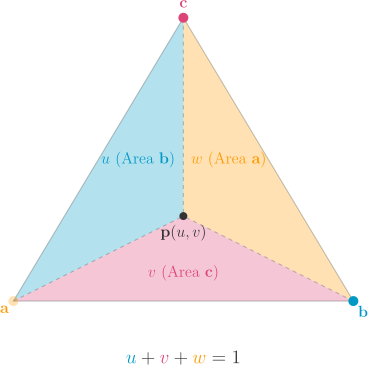
Let’s define the two edge vectors of the triangle originating from ${\color{#FF9900}\mathbf{a}}$ as $\mathbf{e}_1 = {\color{#0099C6}\mathbf{b}} - {\color{#FF9900}\mathbf{a}}$ and $\mathbf{e}_2 = {\color{#DD4477}\mathbf{c}} - {\color{#FF9900}\mathbf{a}}$. The ray hits the triangle when the ray equation equals the triangle plane equation:
$$ {\color{#3273F6}\mathbf{o}} + t{\color{#FF4B4B}\mathbf{d}} = {\color{#FF9900}\mathbf{a}} + u\mathbf{e}_1 + v\mathbf{e}_2 $$Rearranging the terms to isolate our unknowns ($t, u, v$) on the left gives us a system of three linear equations:
$$ \begin{bmatrix} -{\color{#FF4B4B}\mathbf{d}} & \mathbf{e}_1 & \mathbf{e}_2 \end{bmatrix} \begin{bmatrix} t \\ u \\ v \end{bmatrix} = {\color{#3273F6}\mathbf{o}} - {\color{#FF9900}\mathbf{a}} $$Let $\mathbf{s} = {\color{#3273F6}\mathbf{o}} - {\color{#FF9900}\mathbf{a}}$ (the vector from vertex $\mathbf{a}$ to the ray origin). We can solve this $3\times3$ system elegantly using Cramer’s Rule, which expresses the solution in terms of determinants.
Geometrically, the determinant of a $3\times3$ matrix composed of three vectors $\det(\mathbf{u}, \mathbf{v}, \mathbf{w})$ is the scalar triple product, written as $\mathbf{u} \cdot (\mathbf{v} \times \mathbf{w})$. It represents the volume of the parallelepiped formed by the three vectors.
Using Cramer’s Rule, the solution is:
$$ \begin{bmatrix} t \\ u \\ v \end{bmatrix} = \frac{1}{\det(-{\color{#FF4B4B}\mathbf{d}}, \mathbf{e}_1, \mathbf{e}_2)} \begin{bmatrix} \det(\mathbf{s}, \mathbf{e}_1, \mathbf{e}_2) \\ \det(-{\color{#FF4B4B}\mathbf{d}}, \mathbf{s}, \mathbf{e}_2) \\ \det(-{\color{#FF4B4B}\mathbf{d}}, \mathbf{e}_1, \mathbf{s}) \end{bmatrix} $$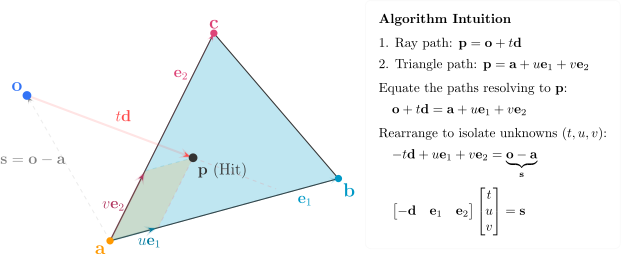
This translates to the famous Möller-Trumbore algorithm. To make it computationally efficient, we define cross products that we can reuse:
- Let $\mathbf{p} = {\color{#FF4B4B}\mathbf{d}} \times \mathbf{e}_2$. The denominator becomes $\mathbf{e}_1 \cdot \mathbf{p}$. If this is $0$, the ray is parallel to the triangle.
- The $u$ coordinate becomes $u = (\mathbf{s} \cdot \mathbf{p}) / (\mathbf{e}_1 \cdot \mathbf{p})$.
- Let $\mathbf{q} = \mathbf{s} \times \mathbf{e}_1$. The $v$ coordinate becomes $v = ({\color{#FF4B4B}\mathbf{d}} \cdot \mathbf{q}) / (\mathbf{e}_1 \cdot \mathbf{p})$.
- The hit distance becomes $t = (\mathbf{e}_2 \cdot \mathbf{q}) / (\mathbf{e}_1 \cdot \mathbf{p})$.
The intersection is strictly inside the triangle if $u \ge 0$, $v \ge 0$, $u + v \le 1$, and $t > 0$. Notice how this brilliantly evaluates the hit without ever explicitly computing the plane’s normal!
3. Signed Distance Functions (SDFs)
In contrast to explicit geometry representations like triangle meshes, a Signed Distance Function (SDF) describes geometry implicitly through a continuous mathematical field. Rather than storing discrete vertices, an SDF evaluates the shortest distance from any given point in space to the nearest surface.
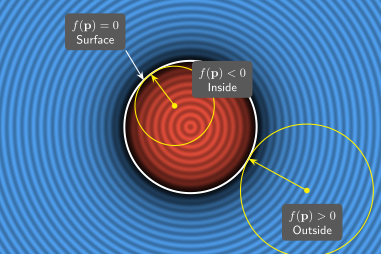
Formally, let $\Omega \subset \mathbb{R}^3$ be a closed set representing a solid object, with its boundary surface denoted by $\partial \Omega$. The signed distance function $f(\mathbf{p})$ at any point $\mathbf{p} \in \mathbb{R}^3$ is defined as the minimum metric distance from $\mathbf{p}$ to the boundary $\partial \Omega$, signed by whether $\mathbf{p}$ is in the interior or exterior of the object:
$$ f(\mathbf{p}) = \begin{cases} +\min_{\mathbf{x} \in \partial \Omega} \|\mathbf{p} - \mathbf{x}\| & \text{if } \mathbf{p} \text{ is outside } \Omega \\ 0 & \text{if } \mathbf{p} \text{ is on the surface } \partial \Omega \\ -\min_{\mathbf{x} \in \partial \Omega} \|\mathbf{p} - \mathbf{x}\| & \text{if } \mathbf{p} \text{ is inside } \Omega \end{cases} $$The sign convention dictates that $f(\mathbf{p})$ is positive outside the object, negative inside, and exactly zero on the surface $\partial \Omega$. Consequently, the surface itself is defined implicitly as the zero-level set of the function: $\partial \Omega = \{\mathbf{p} \in \mathbb{R}^3 \mid f(\mathbf{p}) = 0\}$.
Because $f(\mathbf{p})$ guarantees the exact distance to the nearest surface, it provides a strictly bound spatial radius. If $f(\mathbf{p}) = d$, a sphere of radius $d$ centered at $\mathbf{p}$ is guaranteed to be entirely empty. This property allows ray marching algorithms to safely advance along a ray by distance $d$ without prematurely overshooting the surface.
The Eikonal Equation and Lipschitz Continuity
For a function to be a valid Euclidean signed distance field, it must satisfy the Eikonal equation:
$$ \|\nabla f(\mathbf{p})\| = 1 $$This nonlinear partial differential equation states that the magnitude of the gradient of the function must equal exactly 1 everywhere (except at singularities, such as the medial axis, where the gradient is undefined). Geometrically, this implies that the field’s rate of change perfectly matches physical space: moving one unit of distance directly away from the surface increases the SDF value by exactly one.
In practice, when constructing complex 3D scenes, SDFs are often subjected to spatial deformations—such as scaling, twisting, or blending—that violate the strict Eikonal property. For rendering algorithms like sphere tracing to remain mathematically safe, the function must at least maintain a Lipschitz bound of $1$:
$$ |f(\mathbf{p}) - f(\mathbf{q})| \le \|\mathbf{p} - \mathbf{q}\| $$If the gradient magnitude exceeds 1 ($\|\nabla f\| > 1$), the function overestimates the true distance. A sphere tracer would march too far and step through the surface, causing visual artifacts or missing geometry entirely. Conversely, if the gradient magnitude is substantially less than 1, the algorithm remains mathematically safe but becomes highly inefficient, forcing the ray to take excessively small, conservative steps. Maintaining the Eikonal property, or a strict Lipschitz bound, is a fundamental constraint when designing operations for SDFs.
Constructive Solid Geometry (CSG)
Complex scenes can be constructed from primitive SDFs using Boolean operations. If $a = f_1(\mathbf{p})$ and $b = f_2(\mathbf{p})$ represent the signed distances to two individual shapes at a given point, standard Constructive Solid Geometry (CSG) operations can be formulated as combinations of min and max functions:
float opUnion(float a, float b) {
    return min(a, b);
}

float opIntersection(float a, float b) {
    return max(a, b);
}

float opSubtraction(float a, float b) {
    return max(a, -b);
}

float opSmoothUnion(float a, float b, float k) {
    k *= 4.0;
    float h = max(k - abs(a - b), 0.0);
    return min(a, b) - h * h * 0.25 / k;
}
These operators directly manipulate the distance fields based on their spatial definitions:
- Union (
opUnion): The combined surface is determined by the closest object, yielding the minimum distance. - Intersection (
opIntersection): A point is only inside the intersection if it is inside both shapes, meaning the limiting boundary is the one furthest away (the maximum). - Subtraction (
opSubtraction): Subtracting the second shape from the first involves inverting the second field (turning inside to outside by negating $b$) and then intersecting them. - Smooth Union (
opSmoothUnion): While standard CSG operators introduce non-differentiable $C^0$ seams at the intersection boundaries, smooth operators replace this abrupt transition with a polynomial blending curve of width $k$. While smooth blending slightly violates the Eikonal equation near the transition, it reliably maintains the Lipschitz bound.
Calculating Normals for SDFs
Unlike explicit meshes, implicit surfaces do not inherently store normal vectors. However, the surface normal at any point $\mathbf{p}$ on the boundary $\partial \Omega$ can be derived directly from the distance field. The normal vector $\mathbf{n}$ points in the direction of steepest ascent, which corresponds to the gradient of the SDF, denoted as $\nabla f(\mathbf{p})$.
By definition of the Eikonal equation ($\|\nabla f(\mathbf{p})\| = 1$), the gradient of a mathematically perfect SDF is already a unit vector:
$$ \mathbf{n} = \nabla f(\mathbf{p}) = \begin{pmatrix} \frac{\partial f}{\partial \color{#ef4444}x} \\ \frac{\partial f}{\partial \color{#22c55e}y} \\ \frac{\partial f}{\partial \color{#3b82f6}z} \end{pmatrix} $$In a shader implementation, this continuous derivative is typically approximated using finite differences. The Central Difference method evaluates the SDF at infinitesimally small offsets $\varepsilon$ along each Cartesian axis:
$$ \mathbf{n} \approx \mathrm{normalize}\! \begin{pmatrix} f(\mathbf{p} + \varepsilon {\color{#ef4444}\mathbf{\hat{i}}}) - f(\mathbf{p} - \varepsilon {\color{#ef4444}\mathbf{\hat{i}}}) \\ f(\mathbf{p} + \varepsilon {\color{#22c55e}\mathbf{\hat{j}}}) - f(\mathbf{p} - \varepsilon {\color{#22c55e}\mathbf{\hat{j}}}) \\ f(\mathbf{p} + \varepsilon {\color{#3b82f6}\mathbf{\hat{k}}}) - f(\mathbf{p} - \varepsilon {\color{#3b82f6}\mathbf{\hat{k}}}) \end{pmatrix} $$This formulation requires six evaluations of the distance function. For real-time applications where rendering performance is critical, a Forward Difference method is often preferred. This approach reuses the evaluation at the center point $\mathbf{p}$, reducing the total number of evaluations to four:
$$ \mathbf{n} \approx \mathrm{normalize}\! \begin{pmatrix} f(\mathbf{p} + \varepsilon {\color{#ef4444}\mathbf{\hat{i}}}) - f(\mathbf{p}) \\ f(\mathbf{p} + \varepsilon {\color{#22c55e}\mathbf{\hat{j}}}) - f(\mathbf{p}) \\ f(\mathbf{p} + \varepsilon {\color{#3b82f6}\mathbf{\hat{k}}}) - f(\mathbf{p}) \end{pmatrix} $$(Note: Although a pure SDF yields a unit-length gradient, numerical precision limits, smooth CSG operations, and domain distortions introduce slight deviations from the perfect Eikonal property. Consequently, the resulting normal vector must be explicitly normalized prior to shading calculations).
The following shader demonstrates these concepts by rendering a Torus using sphere tracing, with surface normals calculated dynamically via the forward difference method.
Shading Models
Intersection algorithms tell us where a ray hits and which way the surface faces. Shading models answer the next question: what color should that point be?
When light strikes a surface, part of its energy is absorbed and part is scattered. The physics of this interaction is captured by the Rendering Equation:
$$ L_o(\mathbf{x}, \boldsymbol{\omega}_o) = \underbrace{L_e(\mathbf{x}, \boldsymbol{\omega}_o)}_{\text{Emitted Radiance}} + \underbrace{\int_{\Omega} L_i(\mathbf{x}, \boldsymbol{\omega}_i) f_s(\mathbf{x}, \boldsymbol{\omega}_o, \boldsymbol{\omega}_i) (\mathbf{n} \cdot \boldsymbol{\omega}_i) \, d\boldsymbol{\omega}_i}_{\text{Reflected Radiance}} $$The outgoing radiance $L_o$ toward the viewer equals the emitted light $L_e$ plus the integral of all incoming light $L_i$ scattered by the surface. We integrate over $\Omega$ (the upper hemisphere defined by the surface normal) because opaque surfaces only receive light from their exterior side. The function $f_s$ is the Bidirectional Reflectance Distribution Function (BRDF), which encodes how a material distributes incoming light, and the dot product $(\mathbf{n} \cdot \boldsymbol{\omega}_i)$ accounts for foreshortening via Lambert’s cosine law.
Evaluating this integral is computationally immense — it involves infinite recursive scattering between all objects in the scene. Real-time graphics have therefore historically relied on simpler, empirical models that approximate the result locally.
Gamma Correction: Before we look at the code, it is important to remember that physical light calculations are linear, but our computer monitors display light non-linearly. To fix this, we apply a $1/2.2$ power function to our final color at the very end of our shaders—a process known as gamma correction.
Light Sources and Attenuation
Before applying any reflection model, we first need to know how much light energy actually reaches the surface.
- Directional (Infinite) Lights: Placed infinitely far away (like the sun). All rays are parallel, and intensity does not diminish over distance.
- Point Lights: Radiate equally in all directions from a specific point.
- Spot Lights: Radiate from a point, but restricted to a specific cone/direction.
For point and spot lights, energy disperses as it travels through space. Physically, light intensity falls off according to the inverse-square law ($1/d^2$). However, for artistic control in rendering pipelines, this distance attenuation is generally modeled using constant ($k_c$), linear ($k_l$), and quadratic ($k_q$) terms:
$$ I_{attenuated} = \frac{1}{k_c + k_l d + k_q d^2} I_{source} $$The Phong Reflection Model
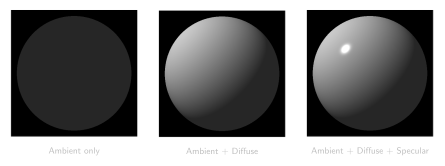
With the incoming light intensity established, we can now compute how the surface responds. The most famous empirical model is the Phong reflection model, which decomposes local illumination into three physically motivated components: Ambient, Diffuse, and Specular.
1. Ambient Light
In the real world, light bounces off walls, floors, and other objects, filling the environment with indirect illumination. Instead of simulating these complex global bounces, the ambient term provides a constant base level of light so that objects in shadow are not completely pitch black.
$$ L_a = k_a I_a $$Here, $I_a$ is the intensity of the ambient light, and $k_a$ is the material’s ambient reflection coefficient.
2. Lambertian Diffuse
A perfectly matte (diffuse) surface, like chalk or unpolished wood, scatters light equally in all directions. Because the scattered light is uniform, the appearance of a diffuse surface does not depend on where the camera is positioned.
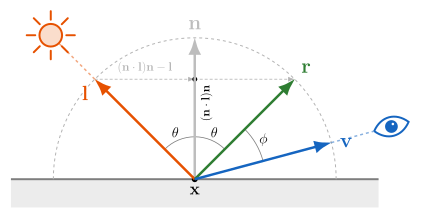
However, it does depend heavily on the surface orientation relative to the light. If you hold a flashlight directly above a surface, the beam is concentrated. If you tilt the surface, the same beam spreads over a larger area, decreasing the intensity per unit area. This is governed by Lambert’s cosine law, which we calculate using the dot product between the normalized surface normal $\mathbf{n}$ and the normalized light direction ${\color{#FF9800}\mathbf{l}}$:
$$ L_d = k_d I_d \max(0, \mathbf{n}\cdot{\color{#FF9800}\mathbf{l}}) $$We clamp the dot product at zero because a negative value means the light is hitting the back of the surface, which should contribute no illumination.
3. Specular Highlights
Smooth surfaces, like polished metal or wet plastic, are not perfect diffusers. They exhibit specular highlights—bright spots where the light reflects strongly in a specific direction. Unlike diffuse reflection, specular reflection is highly dependent on the viewer’s position.
A perfect mirror reflects light exactly along the reflection vector ${\color{#4CAF50}\mathbf{r}}$. Using basic vector projection, we can compute ${\color{#4CAF50}\mathbf{r}}$ by taking the incoming light vector ${\color{#FF9800}\mathbf{l}}$, projecting it onto the normal $\mathbf{n}$, and reflecting it across the normal:
$$ {\color{#4CAF50}\mathbf{r}} = 2(\mathbf{n} \cdot {\color{#FF9800}\mathbf{l}})\mathbf{n} - {\color{#FF9800}\mathbf{l}} $$For surfaces that are shiny but not perfect mirrors, the reflected light scatters in a tight lobe around ${\color{#4CAF50}\mathbf{r}}$. As the angle $\phi$ between the reflection vector ${\color{#4CAF50}\mathbf{r}}$ and the view direction ${\color{#2196F3}\mathbf{v}}$ increases, the intensity drops. Phong modeled this drop-off using a cosine power function:
$$ L_s = k_s I_s \max(0, {\color{#4CAF50}\mathbf{r}} \cdot {\color{#2196F3}\mathbf{v}})^\alpha $$The exponent $\alpha$ is the shininess coefficient. A low value (e.g., $5 - 10$) produces a broad, soft highlight like plastic, while a high value (e.g., $100 - 200$) produces a sharp, tight highlight typical of polished metals.
Combining all three gives the complete Phong reflection model:
$$ L = \underbrace{k_a I_a}_{\text{Ambient}} + \underbrace{k_d I_d \max(0,{\color{#212121}\mathbf{n}}\cdot{\color{#E65100}\mathbf{l}})}_{\text{Diffuse}} + \underbrace{k_s I_s \max(0,{\color{#2E7D32}\mathbf{r}}\cdot{\color{#1565C0}\mathbf{v}})^\alpha}_{\text{Specular}} $$Interactive Phong reflection model. Drag on the sphere to reposition the light; toggle between Phong and Blinn-Phong specular models.
Below is the Phong reflection model applied to a test scene with two spheres on a checkerboard floor. Only local shading is computed here — no shadow rays, no reflections. Notice how the floor receives uniform light everywhere, even directly beneath the spheres where a shadow should be. This is the key limitation of local-only models.
The Blinn-Phong Modification
Calculating the exact reflection vector $\mathbf{r}$ at every pixel requires several vector operations. Jim Blinn proposed a cheaper approximation that produces nearly identical results: the halfway vector.
Instead of finding the angle between the reflection ${\color{#4CAF50}\mathbf{r}}$ and the viewer ${\color{#2196F3}\mathbf{v}}$, we calculate the vector that sits exactly halfway between the light ${\color{#FF9800}\mathbf{l}}$ and the viewer ${\color{#2196F3}\mathbf{v}}$:
$$ {\color{#9C27B0}\mathbf{h}} = \frac{{\color{#FF9800}\mathbf{l}} + {\color{#2196F3}\mathbf{v}}}{\|{\color{#FF9800}\mathbf{l}} + {\color{#2196F3}\mathbf{v}}\|} $$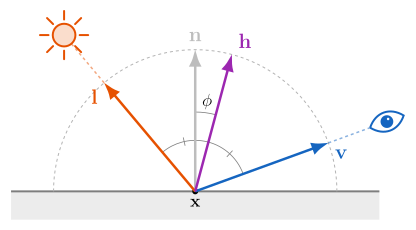
If the halfway vector ${\color{#9C27B0}\mathbf{h}}$ perfectly aligns with the surface normal $\mathbf{n}$, the highlight is at its maximum. The specular term becomes $\max(0, \mathbf{n} \cdot {\color{#9C27B0}\mathbf{h}})^\beta$. (Note that to match the visual size of a Phong highlight, the Blinn-Phong exponent $\beta$ must be roughly $4$ times larger than the Phong exponent $\alpha$).
This was a massive optimization for early rendering pipelines: if the light and the camera are infinitely far away, ${\color{#FF9800}\mathbf{l}}$ and ${\color{#2196F3}\mathbf{v}}$ are constant, meaning ${\color{#9C27B0}\mathbf{h}}$ only needs to be computed once per scene, not once per pixel.
The same scene as above, now shaded with Blinn-Phong. The only code change is in the specular calculation — dot(n, h)^β replaces dot(r, v)^α. The highlights are slightly rounder and wider.
Shading Paradigms: Gouraud vs. Phong
The math above tells us how to calculate color, but the pipeline must decide where to calculate it. In rasterization, there are two primary ways to apply these equations across a triangle mesh:
- Gouraud Shading (Vertex Shading): The lighting equations are evaluated only at the three vertices of a triangle. The resulting colors are then linearly interpolated across the pixels of the triangle. This is very fast, but it suffers from severe artifacts: if a sharp specular highlight falls in the exact center of a large triangle, the vertices will all be dark, and the highlight will completely disappear!
- Phong Shading (Pixel/Fragment Shading): Instead of interpolating colors, we linearly interpolate the normal vector $\mathbf{n}$ across the triangle’s surface. The full lighting equation is then evaluated at every single pixel. This solves the highlight problem and produces beautifully smooth curved surfaces.
Note the terminology: The Phong reflection model (the math equation for ambient/diffuse/specular light) is fundamentally different from Phong shading (the technique of interpolating normals per-pixel). You can technically evaluate the Phong reflection model using Gouraud shading, though it will look poor!
Furthermore, when linearly interpolating unit normal vectors across a triangle in a rasterizer, the resulting vectors will slightly shrink in length. Therefore, they must be re-normalized dynamically in the fragment shader before applying the reflection model.
Limitations: Self-Shadowing and Ambient Occlusion
The Phong and Blinn-Phong models evaluate lighting at each surface point independently — they have no knowledge of the rest of the scene. This means:
- No self-shadowing. A sphere sitting on a floor will not cast a shadow, because the model never asks whether anything blocks the light.
- No contact darkening. Where two surfaces meet (e.g., the base of a sphere on a floor), real-world light is partially occluded by nearby geometry. Local models miss this entirely.
- The ambient term is a flat constant. Every surface point receives the same $k_a I_a$, regardless of how enclosed or exposed it is.
Ambient Occlusion (AO) is a popular technique that addresses the third problem without requiring full global illumination. The idea is simple: at each surface point, estimate what fraction of the surrounding hemisphere is blocked by nearby geometry. Points in corners, crevices, and contact regions score low (more occluded), while exposed surfaces score high.
$$ A(\mathbf{p}) = \frac{1}{\pi} \int_{\Omega} V(\mathbf{p}, \boldsymbol{\omega}) \, (\mathbf{n} \cdot \boldsymbol{\omega}) \, d\boldsymbol{\omega} $$Here $V(\mathbf{p}, \boldsymbol{\omega})$ is a binary visibility function — $1$ if the hemisphere direction $\boldsymbol{\omega}$ is unblocked, $0$ if nearby geometry occludes it. The result $A(\mathbf{p})$ is then multiplied into the ambient (and sometimes diffuse) term, darkening the tucked-away areas that a flat ambient constant would otherwise over-illuminate.
In screen-space implementations like SSAO (Screen-Space Ambient Occlusion), the visibility check is approximated by sampling the depth buffer around each pixel — a fast, purely post-processing approach that requires no scene knowledge at all. In ray-traced pipelines, short-range occlusion rays can compute AO directly.
Here is our test scene rendered with local Phong shading plus an Ambient Occlusion term computed analytically for each sphere. Notice how contact shadows naturally appear underneath the spheres where they approach the floor plane.
We will see full shadow and reflection rays in the next section.
Ray Tracing
The shading models above are strictly local—they only consider the light hitting a surface directly from a source. Whitted ray tracing extends this idea into a global context by tracing visibility recursively. Once a primary ray hits a surface, the rendering algorithm spawns new secondary rays to evaluate the global environment.
Instead of just intersection math, Ray Tracing is defined by this recursive routing logic:
1. Shadow Rays (Visibility Testing)
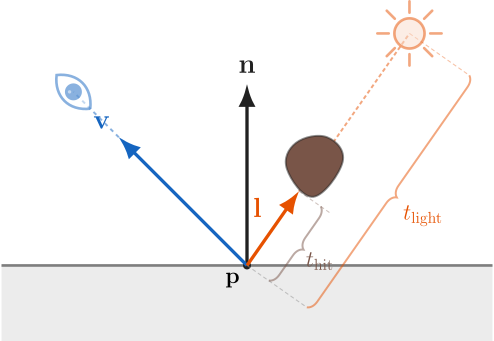
To determine if a point $\mathbf{p}$ is in shadow, we don’t guess. We cast a shadow ray from $\mathbf{p}$ directly toward the light source ${\color{#FF9800}\mathbf{l}}$.
- If the ray hits an object before it reaches the light (${\color{#795548}t_{\text{hit}}} < {\color{#FF9800}t_{\text{light}}}$), the point is occluded. We skip the diffuse and specular calculations and only apply ambient light.
- To prevent a surface from shadowing itself due to floating-point inaccuracies (Shadow Acne), we offset the ray origin slightly along the normal: $\mathbf{p}_{\text{origin}} = \mathbf{p} + \epsilon\mathbf{n}$.
2. Reflection Rays
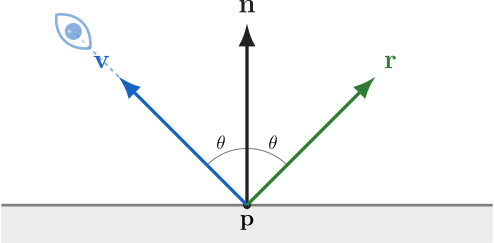
For shiny surfaces like mirrors or water, we calculate the reflection vector ${\color{#4CAF50}\mathbf{r}}$ exactly as we did in the Phong model:
$$ {\color{#4CAF50}\mathbf{r}} = 2(\mathbf{n} \cdot {\color{#2196F3}\mathbf{v}})\mathbf{n} - {\color{#2196F3}\mathbf{v}} $$(Where ${\color{#2196F3}\mathbf{v}}$ points from the surface back to the camera). We then cast a new ray from $\mathbf{p} + \epsilon\mathbf{n}$ in the direction of ${\color{#4CAF50}\mathbf{r}}$. Whatever color that ray eventually hits is added to the current pixel’s color.
3. Refraction Rays (Transmission)
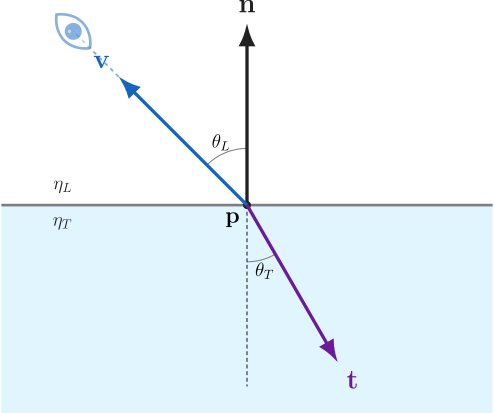
For transparent materials like glass, light bends as it passes through the surface boundary. According to Snell’s Law, the angle of incidence $\theta_L$ and the angle of transmission $\theta_T$ are related by the indices of refraction ($\eta$):
$$ \eta_L \sin \theta_L = \eta_T \sin \theta_T $$To compute the transmission vector ${\color{#9C27B0}\mathbf{t}}$, we decompose it into components parallel and perpendicular to the surface normal $\mathbf{n}$. Let ${\color{#2196F3}\mathbf{v}}$ point from the surface back toward the incoming ray (i.e. ${\color{#2196F3}\mathbf{v}} = -\mathbf{d}$, where $\mathbf{d}$ is the ray direction), and let $\cos\theta_L = \mathbf{n} \cdot {\color{#2196F3}\mathbf{v}}$. Then:
$$ {\color{#9C27B0}\mathbf{t}} = \frac{\eta_L}{\eta_T}\left(-{\color{#2196F3}\mathbf{v}}\right) + \left(\frac{\eta_L}{\eta_T}\cos\theta_L - \cos\theta_T\right)\mathbf{n} $$where the transmitted cosine is recovered from Snell’s Law:
$$ \cos\theta_T = \sqrt{1 - \left(\frac{\eta_L}{\eta_T}\right)^2\!\left(1 - \cos^2\theta_L\right)} $$If the expression under the square root is negative, $\cos\theta_T$ has no real solution. This physical phenomenon is Total Internal Reflection — no light is transmitted; it is all reflected inside the object.
Here is the same scene rendered with full recursive ray tracing. Shadow rays now block direct light where occluded, and reflection rays on the chrome sphere pick up the environment. Compare with the local-only shaders above.
Path Tracing
Whitted ray tracing handles mirrors and hard shadows well, but it cannot capture the soft, diffuse inter-reflections that make real scenes look natural — colored light bleeding from a red wall onto a white floor, for example. Path tracing solves this by actually evaluating the rendering equation via Monte Carlo integration.
Instead of spawning deterministic shadow and reflection rays, the path tracer shoots the ray in a random direction sampled from the hemisphere at each bounce. Over hundreds or thousands of samples per pixel, the noisy estimates converge to the true solution of the rendering equation. This is the same technique used by production renderers in film (Arnold, RenderMan, Cycles).
The key ideas — Monte Carlo integration, importance sampling, and the mathematics of BRDFs — are covered in depth in the next post in this series: A comprehensive look into the Importance Sampling and Path Guiding for Path Tracing
The interactive below shows the same scene under different rendering paradigms. You can compare the local shading models (Phong and Blinn-Phong) — which calculate light per surface and ignore inter-object visibility — with global illumination models (Ray Tracing and Path Tracing), which trace ray paths recursively to simulate shadows, glossy reflections, and diffuse light transport.
Sphere Tracing
As described in the SDF section above, Sphere Tracing (or Ray Marching) is the algorithm that turns the distance returned by an SDF into safe steps along a ray. Instead of solving an analytic equation, we evaluate the field at the current point, advance by that distance, and repeat.
At the level of one march step, the update rule is:
$$ t_{k+1} = t_k + f({\color{#3273F6}\mathbf{o}} + t_k{\color{#FF4B4B}\mathbf{d}}) $$That equation is the heart of the method: the SDF tells us how far we can move along the ray without crossing a surface, so each iteration makes a safe, adaptive jump.
The core loop is simple: march until the distance becomes smaller than an epsilon, or until the ray travels farther than the scene limit. The shader below is just one concrete implementation of that loop for a small scene.
In pseudocode, the algorithm is easy to think about:
SphereTrace(ray origin ro, ray direction rd):
    t = 0
    for i in 1..maxSteps:
        p = ro + t * rd
        d = sceneSDF(p)
        if d < epsilon:
            return hit at p
        t = t + d
        if t > maxDistance:
            break
    return miss
The key idea is that the current SDF value is a guaranteed empty radius around the sample point, so the next evaluation can jump forward by exactly that amount. If the field is exact, this is extremely efficient. If the field is only a bound or has been distorted, the same loop still works, but you usually introduce a safety factor so the steps stay conservative.
If you want to visualize what is happening, it helps to think of the ray as a sequence of expanding circles centered on the current sample point. Each march step uses the SDF value as the radius of the next safe jump, so the circles shrink as the ray gets close to the surface.
Here is the same two-sphere scene, shown through that marching loop.
References
- Richard Szeliski, Computer Vision: Algorithms and Applications.
- Eric Lengyel, Mathematics for 3D Game Programming and Computer Graphics.
- Song Ho Ahn, OpenGL Projection Matrix.
- Song Ho Ahn, OpenGL Viewport Transform.
- Inigo Quilez, 2D Distance Functions.
- Inigo Quilez, 3D Distance Functions.
- Bui Tuong Phong, Illumination for Computer Generated Pictures.
- Turner Whitted, An Improved Illumination Model for Shaded Display.
- James Kajiya, The Rendering Equation.
- Indian Institute of Science (IISc), E0 271: Graphics and Visualization.